Hello.
I have a FormItemIcon to which I want to apply a custom html to the prompt/tooltip.
icon.setPrompt("outside the table<table><tr><td>inside the table</td></tr></table>");
Somehow the the text inside the table does not have the same style as the text outside it. I also tried to set the style inside the table/tr/td elements with no luck.
icon.setPrompt("outside the table<table><tr><td style="myStyle">inside the table</td></tr></table>");
Is this something that is not supported for prompts/tooltips?
Thanks.
That’s just how CSS works in general, styles do not cascade through tables. As far as your attempt to manually put the style on the inner cell, the HTML attribute is “class” not “style”. The “style” attribute expects direct CSS code rather than the name of a CSS style, which is what “class” is for.
The myStyle was just a dummy text to demonstrate what I tried to do. In the particular real situation it was CSS code that set the font.
The problem persists.
The style is not changed, in both cases - using class or using direct style.
A working example would be much appreciated.
If it works in a standalone file, it will work in the hover.
Not really the answer I was looking for there as I have the feeling this hasn’t even been tried.
        FormItem item = new TextItem("myTextItem");
        FormItemIcon icon = new FormItemIcon();
        icon.setSrc("[SKIN]/actions/help.png");
        icon.setPrompt("outside<table><tr><td style="font-size:50px;">inside</td></tr></table>");
        item.setIcons(icon);
Style is not applied to the cell.
Development Mode
smartgwt-2.5.2011-06-28.jar
gwt 2.2.0
Windows XP Professional 5.1 2600
Firefox 3.6.20
Working fine as expected. Is that your literal code with "? That’s not correct HTML, and would not work in a standalone file, which is how we recommended that you test.
Using BuiltInDS sample project:
Modifying only the onModuleLoad() code to:
public void onModuleLoad() {
        HLayout layout = new HLayout();

        boundForm = new DynamicForm();
        TextItem item = new TextItem("example");
        FormItemIcon icon = new FormItemIcon();
        icon.setSrc("[SKIN]/actions/help.png");
        icon.setPrompt("outside<table><tr><td style=\"font-size:50px;\">inside</td></tr></table>");
        item.setIcons(icon);


        boundForm.setItems(item);

        layout.addMember(boundForm);
        layout.draw();
}
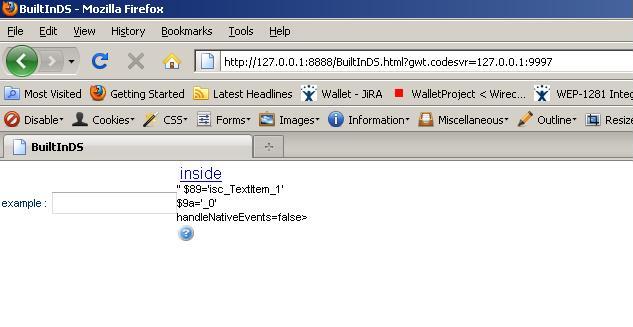
The result is attached…
Found a solution.
Use single quote (') instead of the normal HTML quote (").
Glad to hear you have a workaround.
A quick follow up on this: We’re not reproducing the problem against the 2.5 release - are you using an older version of SmartGWT?