Hi,
I’m trying to integrate SmartClient (+ server libraries) with existing Grails project. I downloaded SmartClient SDK (NOT SmartGWT), copied all the libs from smartclientSDK\WEB-INF\lib to MY_APP\lib, but I can’t figure out the proper place for “isomorphic” dir. When I run my app and try to run some SmartClient code (for example:
=== SmartClient Init: log4j.isc.config.xml not found in CLASSPATH. Assuming log4j configuration for com.isomorphic is located in some other log4j configuration file.
Problem loading builtinTypes.xml
Exception when loading from __USE_CONTAINER__/isomorphic/system/schema/builtinTypes.xml:
java.lang.NullPointerException
	at com.isomorphic.io.ISCFile.<init>(ISCFile.java:145)
	at com.isomorphic.store.ProcessedFileCache.getObjectFromFile(ProcessedFileCache.java:126)
...
I managed to run my application, but it still crashes when I try to use any JSP tag (“<isomorphic:loadISC/>” for example). I’ve merged my web.xml file (jsp-config section too) and placed the iscTaglib.xml file in proper directory.
This is the error that I’ve got:
java.lang.NullPointerException
        at com.isomorphic.taglib.BaseTag.init(BaseTag.java:56)
        at com.isomorphic.taglib.LoadTag.init(LoadTag.java:123)
        at com.isomorphic.taglib.LoadISCTag.doStartTag(LoadISCTag.java:50)
I have that servlet in my web.xml and it is initialised on startup.
That’s my web.xml:
<?xml version="1.0" encoding="UTF-8"?>
<web-app version="2.4"
         xmlns="http://java.sun.com/xml/ns/j2ee"
         xmlns:xsi="http://www.w3.org/2001/XMLSchema-instance"
         xsi:schemaLocation="http://java.sun.com/xml/ns/j2ee http://java.sun.com/xml/ns/j2ee/web-app_2_4.xsd">
    <display-name>/@grails.project.key@</display-name>


    <context-param>
        <param-name>contextConfigLocation</param-name>
        <param-value>/WEB-INF/applicationContext.xml</param-value>
    </context-param>

    <context-param>
        <param-name>webAppRootKey</param-name>
        <param-value>@grails.project.key@</param-value>
    </context-param>

    <filter>
        <filter-name>sitemesh</filter-name>
        <filter-class>org.codehaus.groovy.grails.web.sitemesh.GrailsPageFilter</filter-class>
    </filter>

    <filter>
        <filter-name>charEncodingFilter</filter-name>
        <filter-class>org.springframework.web.filter.DelegatingFilterProxy</filter-class>
        <init-param>
            <param-name>targetBeanName</param-name>
            <param-value>characterEncodingFilter</param-value>
        </init-param>
        <init-param>
            <param-name>targetFilterLifecycle</param-name>
            <param-value>true</param-value>
        </init-param>
    </filter>

    <filter-mapping>
        <filter-name>charEncodingFilter</filter-name>
        <url-pattern>/*</url-pattern>
    </filter-mapping>

    <filter-mapping>
        <filter-name>sitemesh</filter-name>
        <url-pattern>/*</url-pattern>
    </filter-mapping>

    <listener>
        <listener-class>org.codehaus.groovy.grails.web.util.Log4jConfigListener</listener-class>
    </listener>

    <listener>
        <listener-class>org.codehaus.groovy.grails.web.context.GrailsContextLoaderListener</listener-class>
    </listener>

    <!-- Grails dispatcher servlet -->
    <servlet>
        <servlet-name>grails</servlet-name>
        <servlet-class>org.codehaus.groovy.grails.web.servlet.GrailsDispatcherServlet</servlet-class>
        <load-on-startup>1</load-on-startup>
    </servlet>

    <!-- The Groovy Server Pages servlet -->
    <servlet>
        <servlet-name>gsp</servlet-name>
        <servlet-class>org.codehaus.groovy.grails.web.pages.GroovyPagesServlet</servlet-class>
    </servlet>

    <servlet-mapping>
        <servlet-name>gsp</servlet-name>
        <url-pattern>*.gsp</url-pattern>
    </servlet-mapping>

    <!-- The IDACall servlet handles all Built-in DataSource operations -->
    <servlet>
        <servlet-name>IDACall</servlet-name>
        <servlet-class>com.isomorphic.servlet.IDACall</servlet-class>
    </servlet>

    <!-- The DataSourceLoader servlet returns Javascript representations of the dataSources whose
         ID's are passed to it - it is an alternative to using the <loadDS> JSP tag -->
    <servlet>
        <servlet-name>DataSourceLoader</servlet-name>
        <servlet-class>com.isomorphic.servlet.DataSourceLoader</servlet-class>
    </servlet>

    <!-- The FileDownload servlet downloads static files, like a webserver -->
    <servlet>
        <servlet-name>FileDownload</servlet-name>
        <servlet-class>com.isomorphic.servlet.FileDownload</servlet-class>
    </servlet>

	<!-- ISC init: initializes ISC framework -->
    <servlet>
        <servlet-name>Init</servlet-name>
        <servlet-class>com.isomorphic.base.Init</servlet-class>
        <load-on-startup>2</load-on-startup>
    </servlet>

    <servlet>
        <servlet-name>HttpProxy</servlet-name>
        <servlet-class>com.isomorphic.servlet.HttpProxyServlet</servlet-class>
    </servlet>

    <!-- The PreCache servlet initializes when the servlet engine starts up and pre-loads
         data need for all client requests.  This is optional, and improves performance
         of the first few page requests.  PreCache cannot be invoked by a browser, because
         there is no "servlet-mapping" defined for it. -->
    <servlet>
        <servlet-name>PreCache</servlet-name>
        <servlet-class>com.isomorphic.servlet.PreCache</servlet-class>
        <load-on-startup>3</load-on-startup>
    </servlet>

    <!-- RPCManager uses this URL by default for Built-in DataSource operations -->
    <servlet-mapping>
        <servlet-name>IDACall</servlet-name>
        <url-pattern>/isomorphic/IDACall/*</url-pattern>
    </servlet-mapping>

    <!-- Built-in DataSource operations backcompat -->
    <servlet-mapping>
        <servlet-name>IDACall</servlet-name>
        <url-pattern>/isomorphic/IDACall.aspx/*</url-pattern>
    </servlet-mapping>

    <!-- DataSourceLoader requests -->
    <servlet-mapping>
        <servlet-name>DataSourceLoader</servlet-name>
        <url-pattern>/isomorphic/DataSourceLoader</url-pattern>
    </servlet-mapping>

    <servlet-mapping>
        <servlet-name>HttpProxy</servlet-name>
        <url-pattern>/isomorphic/HttpProxy/*</url-pattern>
    </servlet-mapping>

    <!-- Use FileDownload servlet to download all static content that's part of the skin, such as
         image files, so we can set Expires headers and other cache control directives.  In a
         production deployment, you'd want to use a webserver such as Apache to do this.
    -->
    <servlet-mapping>
      <servlet-name>FileDownload</servlet-name>
      <url-pattern>/isomorphic/skins/*</url-pattern>
    </servlet-mapping>

    <!-- serve ISC modules compressed, with expires headers -->
    <servlet-mapping>
        <servlet-name>FileDownload</servlet-name>
        <url-pattern>/isomorphic/system/modules/*</url-pattern>
    </servlet-mapping>

    <!-- serve ISC development modules compressed, with expires headers -->
    <servlet-mapping>
        <servlet-name>FileDownload</servlet-name>
        <url-pattern>/isomorphic/system/development/*</url-pattern>
    </servlet-mapping>

    <!-- server skin assets with expires headers -->
    <servlet-mapping>
        <servlet-name>FileDownload</servlet-name>
        <url-pattern>/isomorphic/system/reference/skin/*</url-pattern>
    </servlet-mapping>


    <welcome-file-list>
        <!--
        The order of the welcome pages is important.  JBoss deployment will
        break if index.gsp is first in the list.
        -->
        <welcome-file>index.html</welcome-file>
        <welcome-file>index.jsp</welcome-file>
        <welcome-file>index.gsp</welcome-file>
    </welcome-file-list>

    <jsp-config>
        <taglib>
            <taglib-uri>http://java.sun.com/jsp/jstl/core</taglib-uri>
            <taglib-location>/WEB-INF/tld/c.tld</taglib-location>
        </taglib>
        <taglib>
            <taglib-uri>http://java.sun.com/jsp/jstl/fmt</taglib-uri>
            <taglib-location>/WEB-INF/tld/fmt.tld</taglib-location>
        </taglib>
        <taglib>
            <taglib-uri>http://www.springframework.org/tags</taglib-uri>
            <taglib-location>/WEB-INF/tld/spring.tld</taglib-location>
        </taglib>
        <taglib>
            <taglib-uri>http://grails.codehaus.org/tags</taglib-uri>
            <taglib-location>/WEB-INF/tld/grails.tld</taglib-location>
        </taglib>
        <!-- Isomorphic JSP tags -->
        <taglib>
            <taglib-uri>isomorphic</taglib-uri>
            <taglib-location>/WEB-INF/tld/iscTaglib.xml</taglib-location>
        </taglib>
        <!-- Serve *.isc files with iscHeader/iscFooter -->
        <jsp-property-group>
            <url-pattern>*.isc</url-pattern>
            <include-prelude>/shared/jsp/iscHeader.jsp</include-prelude>
            <include-coda>/shared/jsp/iscFooter.jsp</include-coda>
        </jsp-property-group>
        <!-- Process *.rpc files as RPC requests - puts you in an iterator over current RPC requests -->
        <jsp-property-group>
            <url-pattern>*.rpc</url-pattern>
            <include-prelude>/shared/jsp/rpcHeader.jsp</include-prelude>
            <include-coda>/shared/jsp/rpcFooter.jsp</include-coda>
        </jsp-property-group>

    </jsp-config>

</web-app>
Make sure you are seeing a series of log4j messages from SmartClient at startup. This error very very clearly indicates initialization has not been run.
The only other possibility would be that you have confused your servlet engine’s classloaders in some way, that is, two instances of the “Init” class have been loaded, in separate classloaders, one is initialized and the other not. This is due to a bug in some servlet engines, notably certain versions of Weblogic, and can usually be cleared up by moving all SmartClient-related .jars to the system classpath instead of having them in WEB-INF.
Finally, if you are being bitten by this classloader bug, nightlies of 8.0 have a workaround for this.
I was able to push it one step further by copying log4j.isc.config.xml file into my “target/classes” directory. That’s strange, because I rewrote its contents to Grails logging configuration file earlier…
Anyway, now I can see a series of SmartClient messages in my log at startup.
I have a DataSource that represents my domain class “Book” and I want to use DMI for fetching, updating etc. But when I call dataSource.fetchData in my JS code, it does absolutely nothing - no errors, no requests.
That’s my DataSource:
I tried to instantiate that request in my server code:
DSRequest req = new DSRequest("Book", "fetch");
DSResponse resp = req.execute();
but then it crashes with the following error:
Caused by: java.lang.Exception: Operation type 'fetch' not supported by this DataSource (Book)
	at com.isomorphic.datasource.DataSource.notSupported(DataSource.java:1360)
	at com.isomorphic.datasource.DataSource.executeFetch(DataSource.java:1309)
	at com.isomorphic.datasource.DataSource.execute(DataSource.java:798)
	at com.isomorphic.application.AppBase.executeDefaultDSOperation(AppBase.java:708)
	at com.isomorphic.application.AppBase.executeAppOperation(AppBase.java:665)
	at com.isomorphic.application.AppBase.execute(AppBase.java:498)
	at com.isomorphic.datasource.DSRequest.execute(DSRequest.java:1175)
	at SCController$_closure1.doCall(SCController:89)
Calling fetchData will lead to either an error or a request, there is no other possibility. Most likely, you are not looking correctly for errors or requests. Try, for example, the Developer Console in Internet Explorer - an error, if there is one, will show up in the Results tab, a request will appear in the RPC tab once you check “track requests”.
This indicates the request was sent, but your server did not respond at that URL. This could be some kind of firewall interaction.
Your Firebug is giving impossible results and so is probably broken in some way. You might want to upgrade it or the browser, or reinstall one or both. Also consider using Fiddler (fiddlertool.com) as an alternative.
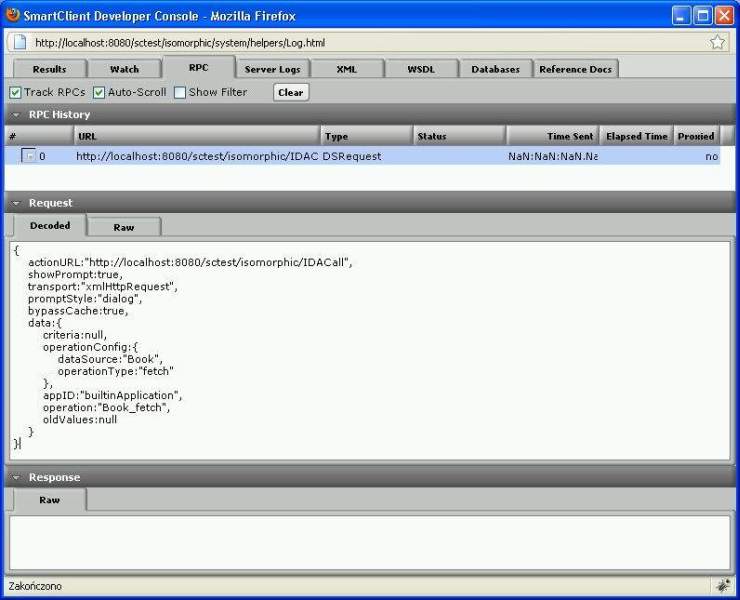
I ran the DataSource.fetchData method a few times and that’s what happened: (attachment).
Looks like all requests land in a queue and for some reason they are never sent to the server. All of them have no “Time sent” data, their “Status”, “HTTP Status” and “Elapsed time” are empty. They have a 240-second timeout. Nothing happens after that time.
It’s pretty clear that the code that you’re posting here has nothing to do with the results you’re reporting - please stop doing that as we can’t spend time puzzling over bad information.