Hello Community,
I am currently evaluating GWT and SmartGWT for a back-office application. While being very enthusiastic about the SmartGWT-capabilities I am suffering a major problem regarding 1:n-Selections from backend-model to frontend.
This is what I am trying to achive:
- I have a customer-entity that is associated to a country.
- A country is not a free text-field, but realized by an association to a separated entity (using Longs as primary keys for all entities).
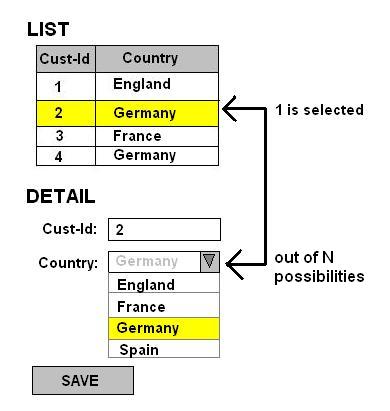
- I’d like to display (1) a list-grid containing all customers and (2) a dynamic-form for updating existing / adding new customers. Beside other attributes the country-name should (1) be shown in the list-grid as a read-only text-field and (2) be editable by a select-box containing all possible country-names. By pressing a save-button the customer-entity should be passed (for creation or updating) to the server.
- While passed to the server a (changed) country should be identified by its primary key. The backend is supposed to process the customer-entity and country-relationship accordingly.
- The possible countries should be retrieved from the server either (a) when the according view is oppened or (b) when a list-grid-entry is clicked.
- The attached image illustrate my objective.
This is my basic architecture:
- Server works with Hibernate-POJOs.
- I am transferring defined DTOs via GWT-RPC. Business-logic might transfer slightly differing (from backend-model) DTOs.
- I am working with DataSources passed by GWT-activities to the SmartGWT-view-components. DataSources are derived from GwtRpcDataSource (taken from smartgwt-extensions) for bridging SmartGWT and GWT-RPC.
This is my project-setting:
- GWT 2.1, SmartGWT 2.4, Hibernate 3, Dozer
This is the model (Hibernate-POJO):
public class Country {
	private Long id;
	private String name;
	// ... additional fields + getters and setters
}

public class Customer {
	private Long id;
	private Country addressCountry;
	// ... additional fields + getters and setters
}
The DTOs (transferred via GWT-RPC): (pretty similar to the POJOs above)
public class CountryDTO {
	private Long id;
	private String name;
	// ... additional fields + getters and setters
}

public class CustomerDTO {
	private Long id;
	private CountryDTO addressCountry;
	// ... additional fields + getters and setters
}
I am working with two GwtRpcDataSource-derived data-sources:
public class CountryDataSource extends GwtRpcDataSource {
	public CountryDataSource() {
		setID("countryDS");

		Field field = new DataSourceIntField("country_id");
		field.setPrimaryKey(true);
        field.setRequired(true);
		addField(field);

		field = new DataSourceTextField("country_name");
		addField(field);
	}

	// ... fetching using GWT's AsynchCallback-class (countries are fetch-only)

	// method to convert a DTO to a record
	private static void mapToRecord(CountryDTO country, Record toRecord) {
		toRecord.setAttribute("country_id", country.getId());
		toRecord.setAttribute("country_name", country.getName());
	}
}

public class CustomerDataSource extends GwtRpcDataSource {
	public CustomerDataSource(CountryDataSource countryDataSource) {
		setID("customerDS");

		Field field = new DataSourceIntField("customer_id");
		field.setPrimaryKey(true);
		addField(field);

		field = new DataSourceIntField("customer_country_id");
		field.setForeignKey("countryDS.country_id");

		// HERE I AM WORKING WITH A CUSTOM EDITOR FOR THIS FIELD
		SelectItem countrySelectItem = new SelectItem();
		countrySelectItem.setOptionDataSource(countryDataSource);
		countrySelectItem.setOptionDataSource(countryDataSource);
		countrySelectItem.setAutoFetchData(true);
		countrySelectItem.setValueField("country_id");
		countrySelectItem.setDisplayField("country_name");
		field.setEditorType(countrySelectItem);

		addField(field);
	}

	// ... fetching, updting, adding, creaing using GWT's AsynchCallback-class

	// method to convert a DTO to a record
	private static void mapToRecord(CustomerDTO fromCustomer, Record toRecord) {
		toRecord.setAttribute("customer_id", fromCustomer.getId());
		toRecord.setAttribute("customer_country_id", fromCustomer.getCountry().getId());
	}

	// method to convert a DTO to a record
	private static void mapToRecord(Record fromRecord, CustomerDTO toCustomer) {
		toCustomer.setId(fromRecord.getAttribute("customer_id"));
		toCustomer.getCountry().setId(fromRecord.getAttribute("customer_country_id"));
	}
}
On the frontend I work with the following code:
// ...

VLayout vLayout = new VPanel();

// The data-sources
CountryDataSource countryDataSource = new CountryDataSource();
CustomerDataSource customerDataSource = new CustomerDataSource(countryDataSource);

// The detail-form
DynamicForm form = new DynamicForm();
form.setDataSource(customerDataSource);
form.setIsGroup(true);
vLayout.addMember(form);

// The list
ListGrid listGrid = new ListGrid();
listGrid.setDataSource(customerDataSource);
listGrid.setAutoFetchData(true);
listGrid.addRecordClickHandler(new RecordClickHandler() {
    public void onRecordClick(RecordClickEvent event) {
        form.reset();
        form.editSelectedData(listGrid);
    }
});
ListGridField listGridIdField = new ListGridField("customer_id");
ListGridField listGridCountryField = new ListGridField("customer_country_id");
listGrid.setFields(listGridIdField, listGridCountryField);
vLayout.addMember(listGrid);

vPanel.draw();

// ...
These are the problems I encountered:
- When I first click on a customer-entity (without having touched the details before) the country-select-box shows the country-id instead of the according country-name. When I then open the select-box the number is adjusted to the according country-name (so far so good). When I then select another country-name the select-box changes its content accordingly, nevertheless it doesn’t really seem that the content of the select-box changed, because when I open the select-box again, the initial country-name is pre-selected, although when closing it shows the correct changed entry again (very confusing).
- When I try to save the customer-entry, I get the following exception and the executeUpdate-method in the CustomerDataSource is been omitted. Exception:
Caused by: com.google.gwt.core.client.JavaScriptException: (null): null
    at com.google.gwt.dev.shell.BrowserChannelServer.invokeJavascript(BrowserChannelServer.java:237)
    at com.google.gwt.dev.shell.ModuleSpaceOOPHM.doInvoke(ModuleSpaceOOPHM.java:126)
    at com.google.gwt.dev.shell.ModuleSpace.invokeNative(ModuleSpace.java:561)
    at com.google.gwt.dev.shell.ModuleSpace.invokeNativeVoid(ModuleSpace.java:289)
    at com.google.gwt.dev.shell.JavaScriptHost.invokeNativeVoid(JavaScriptHost.java:107)
    at com.smartgwt.client.widgets.form.DynamicForm.saveData(DynamicForm.java)
These are further questions I have:
3. When using my UI I see in the logs for every single customer selected a new fetch-access to the countries. It’s not the most important thing, but I’d like to know how do I just fetch the countries once a view is opened (not every time a customer-entry is clicked)?
4. Due to the asynchronious nature of GWT-applications there is no garanty that the response to the call to retrieve the country-list preceeds the result of a customer-list.
Any help would be much appreciated. Thanks a lot in advance!
Regards,
Paul