Header button bottom border disappears on rollover

Skin: Stratus

Description:
When a border is defined for a header button style, the bottom border disappears on mouse rollover.

Steps to reproduce:

  1. Open the Column Order example: SmartClient™ Showcase 15.0d Enterprise [2026-10-22]
  2. Modify the header button style in the source code to use the standard button style (with a visible border).
  3. Start the example.
  4. Move the mouse cursor over a column header.

Actual result:
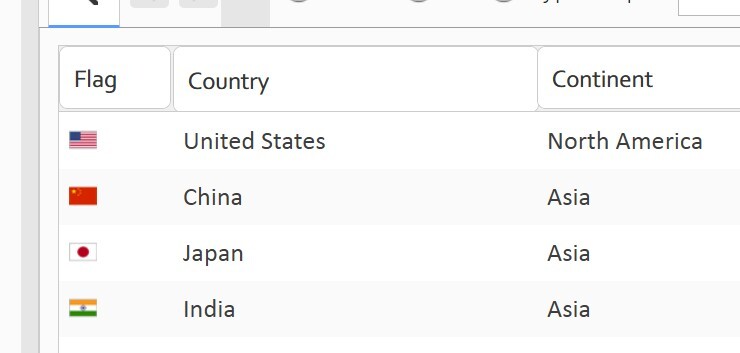
The bottom border of the header button disappears while the mouse is over the header.

Notes:
The issue can be reproduced with the Stratus skin after assigning a bordered button style to the header button. It appears that the rollover styling or header rendering logic removes or overrides the bottom border.

isc.ListGrid.create({
    ID: "countryList",
    width:500, height:224,
    data: countryData,
    headerBaseStyle: "button",
    fields:[
        {name:"countryCode", title:"Flag", width:65, type:"image", imageURLPrefix:"flags/24/", imageURLSuffix:".png"},
        {name:"countryName", title:"Country"},
        {name:"capital", title:"Capital", showIf:"false"},
        {name:"continent", title:"Continent"}
    ],
    canReorderFields: true
})


isc.IButton.create({
    left:0, top:240,
    title:"Show Capitals",
    click:"countryList.showField('capital')"
})

isc.IButton.create({
    left:130, top:240,
    title:"Hide Capitals",
    click:"countryList.hideField('capital')"
})

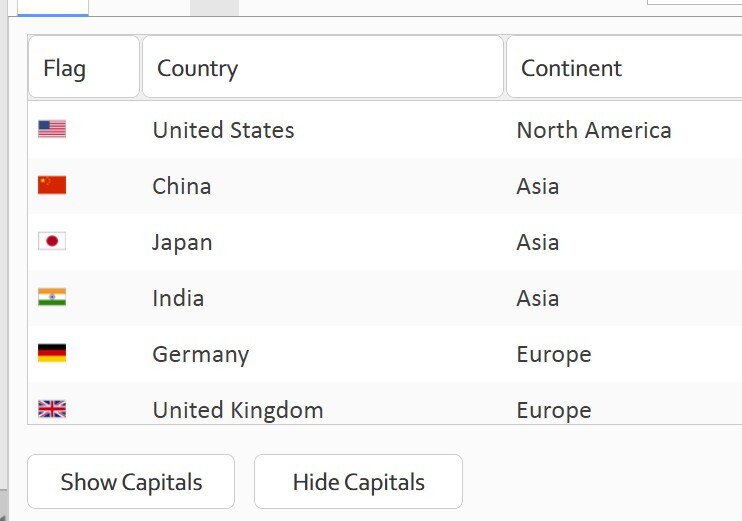
The screenshot below shows the initial state before the mouse is moved over the header button.
The screenshot below shows the Country column header button after mouse rollover.

I apologize for my previous post.

The issue occurs on a monitor with display scaling set to 125%.

However, there is another issue that occurs with 100% display scaling.

The bottom border of the grid filter editor also disappears.

See the screenshot below.

For the TextItem component, I use the following skins.

.textItem,
.textItemOver,
.textItemFocused,
.textItemFocusedOver,
.textItemDisabled,
.textItemDisabledHint,
.textItemError,
.textItemErrorOver,
.textItemHint {
  border: var(--border);
  border-radius: 4px;
  padding-left: 8px;
  padding-right: 2px;
}
.textItemError,
.textItemErrorOver {
  border: 1px solid var(--error-color);
}
.textItemOver {
  border: 1px solid white;
}
.textItemFocused,
.textItemFocusedOver {
  border: 1px solid var(--accent-color);
}
.textItemDisabled,
.textItemDisabledHint {
  border: var(--border);
  color: var(--disabled-font-color);
}
    if (isc.TextItem) {
        isc.TextItem.addProperties({
        wrapTitle: false,
        showOver: true,
        showFocused: true,
        showHint: true,
        showHintInField: true,
        hint: "...",
        height: 30,
        });
    }
        isc.ListGrid.addProperties({
....................
            headerHeight: 32,
            headerMenuButtonHeight: 30,
            expansionFieldImageWidth: 16,
            expansionFieldImageHeight: 16,
            cellHeight: 32,
            normalCellHeight: 32,
            summaryRowHeight:32,
            filterEditorHeight: 32
        });

Thanks for the report.

We’ve made a framework change to address the first issue, and ones like it, at any browser/OS zoom.

You can try it out in tomorrow’s build, dated June 18, or a later one.

Note that for your second issue at 100% zoom, the problem is very likely that your ListGrid.headerHeight (a fixed value) just isn’t tall enough for the widgets’ minimum heights, and is clipping the filterEditor. If making it a bit taller doesn’t address the issue, we may need to see a runnable test case, including your LG config and CSS (you can include css in your test-code if you want, with isc.StyleSheetHandler.create({ autoLoad: true, cssText: “…” })).